


One of WordPress’ best, little-known features is the ability to schedule posts to automatically publish to your blog on a future date. This feature is a godsend, particularly for travel bloggers who are keen on publishing fresh content to their blogs on a regular basis but may be away from a computer or reliable internet connection for days or weeks at a time.
Vagabondish is reader-supported. When you buy through links on our site, we may earn a small affiliate commission. Read our disclosure.
I also use scheduled postings to help with writer’s block. My inspiration to blog comes throughout the day – via my RSS subscriptions (i.e. other travel blogs), watching The Travel Channel, or taking a leisurely Sunday drive. But oftentimes, the creativity and will to elaborate those fleeting moments of inspiration into full blog posts strikes me only a couple of days each week. Yesterday, for example, I wrote five posts and scheduled them to publish throughout this coming week.
WordPress makes scheduling your posts a snap and I’ll show you how. I can’t speak for every blogging platform, although I know Movable Type also offers this feature (see Setting Up Scheduled Post Services for more info on that).
-
Step 1:
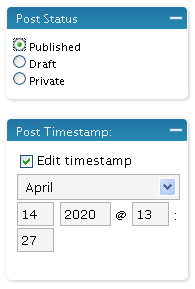
- In the right-hand column, change the “Post Status” to Published.
- Also in the right-hand column, in the “Post Timestamp” box, check the box marked “Edit timestamp”. Change the time/date to the time and date in the future when you’d like your post to automatically publish to your blog.
- Lastly, click the “Save” button (not Publish) to save all of your changes.
First, login to your WordPress admin panel as usual.
Step 2:
From the top navigation, click on “Write”. This will bring up the “Write a New Post” page by default.
Step 3:
Write your new post as usual, saving it along the way if you like.
Finally:
When you’re done and ready to schedule your post, follow these three steps:
That’s all there is to it! Now when you visit your “Dashboard” page in the WordPress admin panel, you’ll see a box titled “Scheduled Entries” with a listing of all your scheduled postings. Pretty sweet, eh?